CINEMA 4D • PLUGIN
Poly Greeble.
The Poly Greeble Cinema 4D plugin by Merk Vilson adds procedural surface detail using repeated greeble elements. Use it as a Cinema 4D greeble generator for layered panels, mechanical structures and smaller details across a source object.
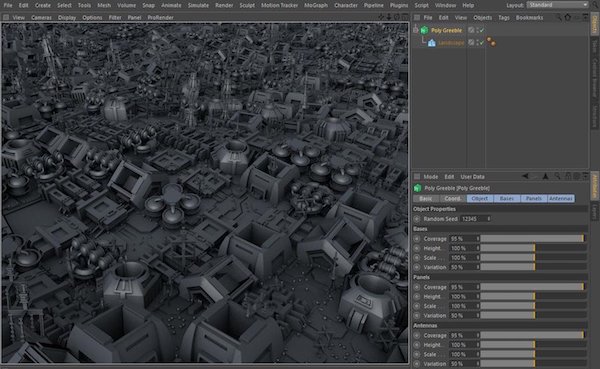
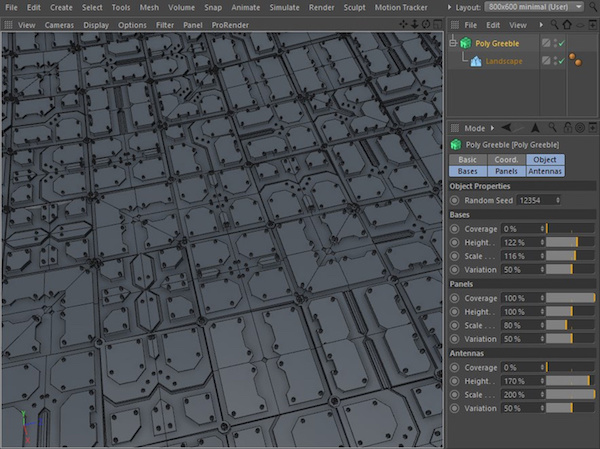
Build sci-fi props, hard-surface assets or abstract forms, then adjust the balance of detail to suit your shot. The examples below show generated surfaces, the Bases, Panels and Antennas controls, and the included component browser.
Creator-listed compatibility: Cinema 4D R15–2026.

AT A GLANCE
Poly Greeble Cinema 4D plugin
features.
Populate a source object with procedural surface detail
Build layered detail on polygon objects and primitives
Adjust Bases, Panels and Antennas separately
Browse the included greeble components visually
Explore variations using the random seed and layer settings

02 / BUILT FOR YOUR WORKFLOW
Build detail
at the right scale.
Repeated greeble elements create a layered surface without modeling every small component individually. Start with larger structures that establish the form, then add finer pieces where they contribute to the image.
Check the result from your intended camera distance. Detail that works in a close-up can become visual noise in a wide shot, so choose density and scale together rather than filling every available area.
03 / BUILT FOR YOUR WORKFLOW
Three layers.
One surface.
The reference interface separates Bases, Panels and Antennas. Think of these as different scales of structure: establish the larger forms, balance the panel detail and add smaller projecting elements where they help the silhouette.
Work on one layer at a time. The displayed coverage, height, scale and variation settings help you compare restrained and denser treatments without changing every part of the surface at once.
04 / BUILT FOR YOUR WORKFLOW
Browse components.
Compare variations.
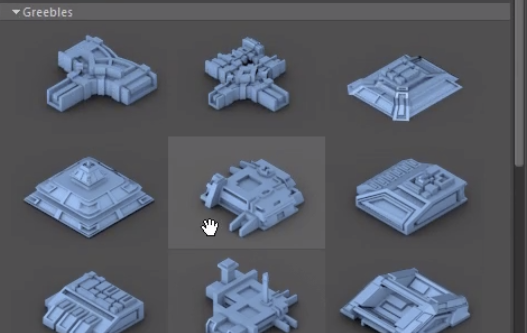
The component browser shows thumbnail previews of the greeble elements. Use those shapes as a visual starting point, then compare how a variation reads on your source geometry.
Save useful scene versions and change one setting at a time. The random seed provides another way to explore arrangements while keeping a promising setup available to return to.
05 / BUILT FOR YOUR WORKFLOW
Keep the source.
Refine the result.
Keep the generator setup and source object available while developing the look. That makes it easier to revisit the detail settings instead of rebuilding a surface after each creative change.
Viewport and render performance depend on the amount of generated geometry and the wider scene. Test a manageable section before committing to a dense asset or long animation.

06 / BUILT FOR YOUR WORKFLOW
Detail with
a purpose.
Sci-fi surfaces: build panel rhythms on ships, stations and machinery.
Mechanical props: add layered structures to areas that need visual interest.
Abstract forms: compare repeated patterns across a simple shape.
Leave quieter regions around focal points so the detail supports the composition.
Use a small test render to judge materials, shadows and the density of the finished surface.
Greeble library included
The included greeble library provides component shapes to begin with. The browser screenshot shows individual pieces, while the surrounding examples illustrate how repeated elements combine into a larger surface.
Choose components that suit the scale of the asset, then refine their distribution and variation in the generator.
START WITH A SIMPLE SCENE
Start small.
Build the layers.
- Check the plugin build. Use the creator’s download for your Cinema 4D version. Our Cinema 4D plugin installation guide explains the general folder setup; follow the supplied instructions for plugin-specific steps.
- Choose a simple source. Begin with a primitive or low-detail polygon object so the generated surface is easy to judge.
- Balance the layers. Compare Bases, Panels and Antennas individually. Adjust coverage and scale in small steps using the reference interface as a guide.
- Explore an arrangement. Change the random seed, compare the result and save a useful variation before making larger changes.
- Check the shot. Add materials and lighting, then make a small render. Reduce unnecessary detail if it does not read at the final camera distance.
GOOD TO KNOW
Poly Greeble
questions.
What is greebling?
Greebling adds small repeated structures to a surface to suggest mechanical complexity and scale. Poly Greeble automates that kind of detailing using procedural controls and component geometry.
What are Bases, Panels and Antennas?
They are the three detail layers shown in the reference interface. Adjust them separately to balance larger structures, panel patterns and smaller projecting elements.
Does more detail always give a better result?
No. Match the density to the camera distance and the role of the asset. Extra geometry can increase scene complexity without improving what the viewer sees.
Which Cinema 4D versions are supported?
The creator currently lists Poly Greeble 1.3 for Cinema 4D R15–2026. Check the current creator listing before buying or updating. This is creator-listed compatibility, not a claim that Alpha Pixel has tested every release.
Who develops Poly Greeble?
Poly Greeble is developed by Merk Vilson. The purchase buttons use our affiliate link to the creator’s Gumroad checkout. Current downloads and product support are provided by the creator.
COMPATIBILITY